Free to play in your browser — no install, no sign-up.
Kaku
Draw rectangles, clear the grid.
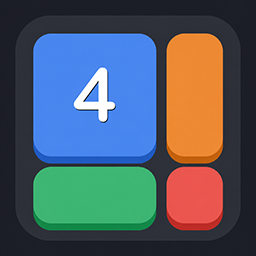
Kaku is our take on Shikaku, the elegant Japanese rectangle-division puzzle. Split the grid into rectangles so that each one contains exactly one number — and that number equals the rectangle's area.

Game overview
What is Kaku?
It is pure spatial logic: no guessing, no luck, every puzzle has exactly one solution you can reason your way to. Start with bite-sized boards and work up to grids that will really stretch your brain.
At a glance
- Drag on the grid to draw a rectangle.
- Each rectangle must contain exactly one number.
- The number must equal the rectangle's area (width x height).
- Cover the whole grid with no overlaps to solve the puzzle.
How a Kaku board works
Every Kaku puzzle starts as a dark grid with a few numbers scattered over it. You divide the whole grid into rectangles, and each rectangle must contain exactly one number. That number is the rectangle's area: a 6 can be a 2x3 or 3x2 block, or a straight strip of six squares, while a 5 can only ever be a strip. When every square belongs to a rectangle, the puzzle is solved.
The genre is known as Shikaku in Japan. Every board in Kaku has one solution, and the generator checks that it can be reached by logic alone, so there is never a point where you have to guess.
Drawing and removing rectangles
Drag from one corner of a rectangle to the opposite corner. A preview follows your finger, and the rectangle is placed when you let go.
If the shape breaks a rule, the game refuses it with a red flash and a short message saying why: it overlaps another piece, it holds no number, it holds two numbers, or its size does not match the number.
Tap a placed rectangle to remove it.
Rectangles revealed by a hint are locked and show a small lock icon, because they are known to be right.
One thing to know early: a rectangle that follows the rules is accepted even if it is not part of the final answer. Kaku does not tell you about those right away. You find out when the rest of the board will not fit, and then you simply tap the doubtful piece away and try another shape. There are no lives and no time limit, so experimenting costs nothing.
Hints
The hint button reveals one correct rectangle. If any of your own pieces are sitting where it needs to go, they are cleared first so the hint always lands. Everyone starts with three hints, and on days when you have fewer than three, one free hint is added. In the Google Play app you can also watch a short ad for two more hints, up to five times a day, or pick up a hint pack in the shop. The browser version on this page has no ads or purchases, so the daily free hint is how it refills.

Four difficulties, 4,000 puzzles
Each difficulty holds 1,000 puzzles and remembers where you stopped. The main screen offers Continue for your current puzzle and Change Mode for switching.
ten small 5x5 starters, then 7x7.
7x7 for the first 300, then 8x8.
9x9 for the first 400, then 10x10.
12x12 for the first 600, then 13x13.
Difficulty is not just about bigger numbers. Large rectangles are often easy to spot, so harder puzzles use more pieces, a wider mix of sizes and fewer squares that can be settled at a glance.

Daily challenge and trophies
A new puzzle is made for every date. Days 1 to 10 of the month use a 7x7 grid, days 11 to 20 use 8x8 and the rest use 9x9, so the end of the month is noticeably tougher. You can pick today or any earlier date in the calendar, and finished days are marked with a star. Finish every day in a month to earn that month's trophy.

Brain Level and stats
Every new rectangle you place earns points toward your Brain Level, shown as an IQ number from 100 to 200, with more points on harder difficulties. Along the way you move through six titles, from Beginner and Bright Mind up to Genius and Einstein. The profile tab adds three stats for spatial sense, logic and focus, a weekly chart, your play streak and your trophies.

Tips for new players
A number near a corner or squeezed between other numbers may have just one rectangle that fits. Place those first and the board opens up.
A prime number cannot be split into a block wider than one square, so it is always a straight line. That rules out a lot of shapes at once.
A legal rectangle can still be wrong. If an area refuses to fill, tap away the piece you were least sure about.
A hint clears anything in its way, so it is a good way to fix a corner you have tangled up without restarting the board.
The guides below solve real Easy, Normal and Hard boards one step at a time.
Step by step
Guides for Kaku
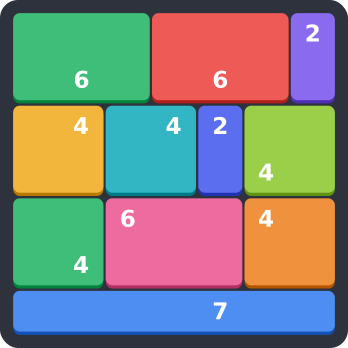
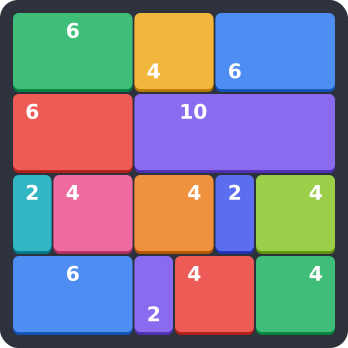
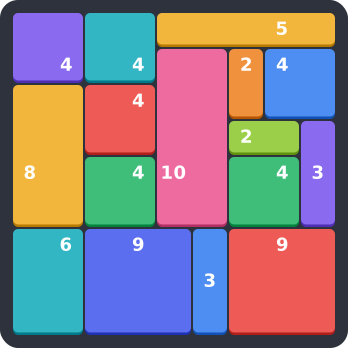
Each guide takes one real board from the game and solves it move by move, with a picture for every step.
Why players come back
Features
- Classic Shikaku rules with a clean, modern board
- Every puzzle is verified to have a unique solution
- 4,000 puzzles in four difficulties, from 5x5 Easy up to 13x13 Expert
- No time limit, no lives - daily challenge and monthly trophies when you want more
- Play free in your browser - also on Google Play
Common questions
Frequently asked questions
Is Kaku free?
Yes. You can play it free in your browser on this page, with no ads. The Google Play app is free as well, shows ads at some points and offers optional hint packs and an ad-free starter pack.
Is Kaku the same as Shikaku?
It uses the classic Shikaku rules: split the grid into rectangles, one number per rectangle, number equals area. Kaku adds four difficulties, daily puzzles, trophies and a Brain Level on top.
What happens if I place a wrong rectangle?
Nothing bad. There are no lives or timers. If a legal piece turns out to be wrong, the board simply cannot be finished until you remove it.
Is my progress saved?
Yes. A puzzle you leave halfway is restored when you come back, and your progress in each difficulty, hints and Brain Level are saved. In the browser your account is tied to that browser, so clearing site data starts over.
Which languages are supported?
Kaku is available in 14 languages, including English, Korean and Japanese.